Client document collection software for accounting firms
One request list per engagement and period. Clients upload onto the item, an agent checks what arrived against what was asked for, and follow-ups for missing items are drafted for a person to approve.
Updated 2026-10-17
Most firms already know what they need from each client. The hard part is everything after the request goes out: the W-2 that arrives as a phone photo in an email thread, the 1099-B for the wrong account, the K-1 that is “coming next week” for the third week running, and the staff hours spent working out which of forty items are actually still missing. Client document collection software for accounting firms should make that state obvious and keep the conversation attached to the item it is about.
InflowSheet handles collection on the engagement itself. Each engagement and period has one request list. The firm works from it, the client answers it, and it feeds the request counts on the engagement overview and the home screen’s Open Items next action.
One request list per engagement and period
The list is grouped into sections (Income Documents, Deductions & Credits, and so on in a tax engagement) and each row shows the section, the document requested, who it is assigned to, whether it has been received, its review state and its status. Rows also carry a risk rating, so a high-risk item does not get lost among routine ones.
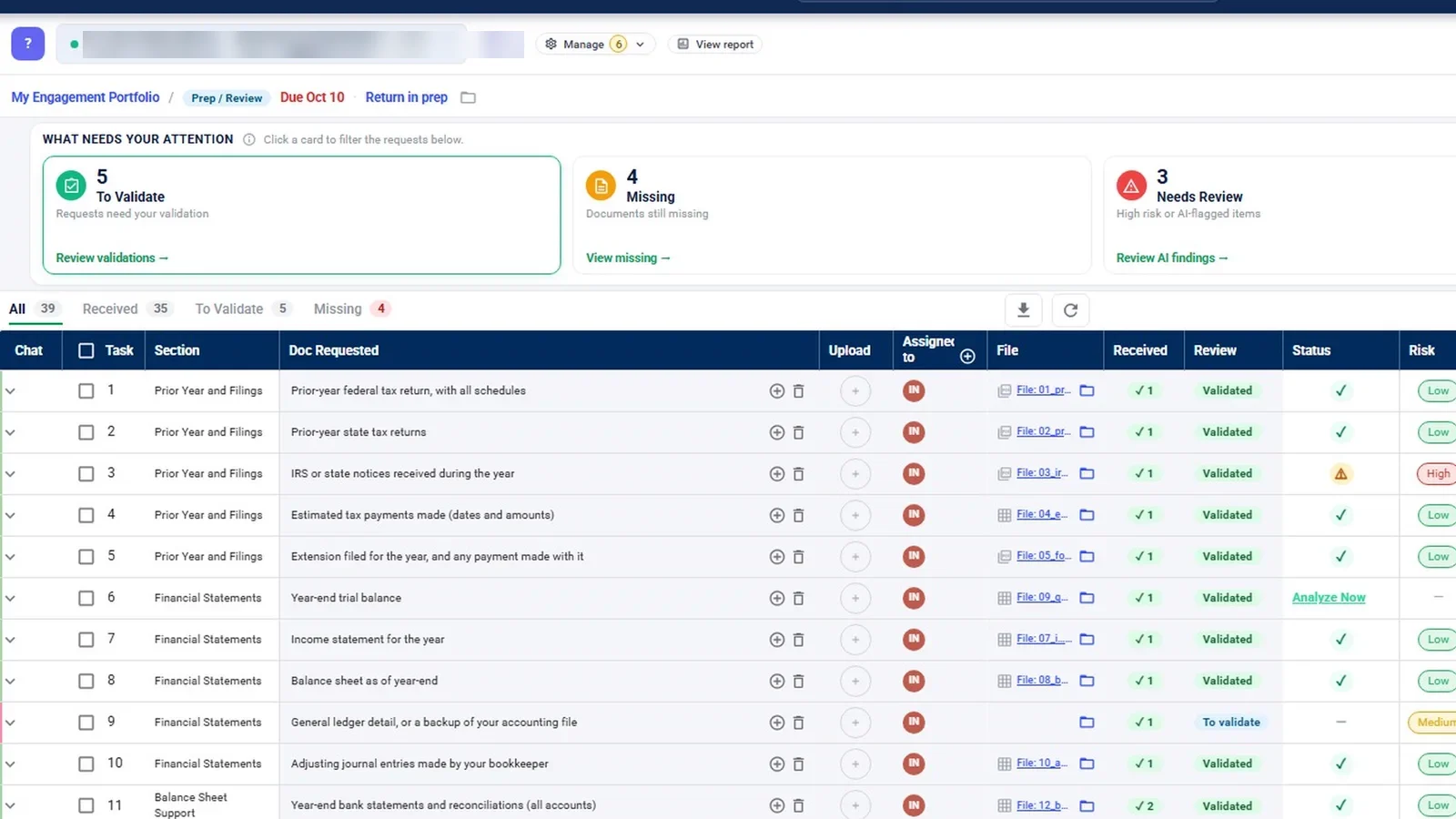
Above the table, “What needs your attention” cards filter the list to what someone has to act on: items To Validate, items Missing, and items that Need Review because they are high risk or an agent flagged them. Tabs (All, Received, To Validate, Missing), filters and a column chooser help on long lists. The review states themselves are plain: Missing, To validate, Questioned, Validated and N/A.
Building the list
A list can be started from a previous engagement, a saved template, or from scratch, or uploaded from an Excel template in column or matrix form. When a client rolls into a new period, the responsible people carry forward and due dates move 12 months ahead. Chat, statuses, received files and risk ratings do not roll, so each year starts clean.
What the client does
Clients come in by invitation, sent from the engagement’s Manage menu or through “Grant request access”. They see the list as My Documents and upload straight onto the request item: drag and drop up to 30 files at 10 MB each, or take a photo with a phone camera. Because the upload lands on the row, nobody at the firm has to work out which email attachment answers which request.
Every request row has its own chat thread. If the client has a question about the brokerage statement, it is asked on the brokerage statement row, and the answer stays there. A colleague can be @mentioned on the thread and gets an email notification. For the client-facing side in more detail, see the client portal page.
A completeness check on every upload
Receiving a file is not the same as receiving the right file. Uploads that need a look wait as pending until a firm user reviews them. A completeness agent compares each received document with what was requested and looks for the usual problems: wrong document type, wrong tax year, wrong entity.
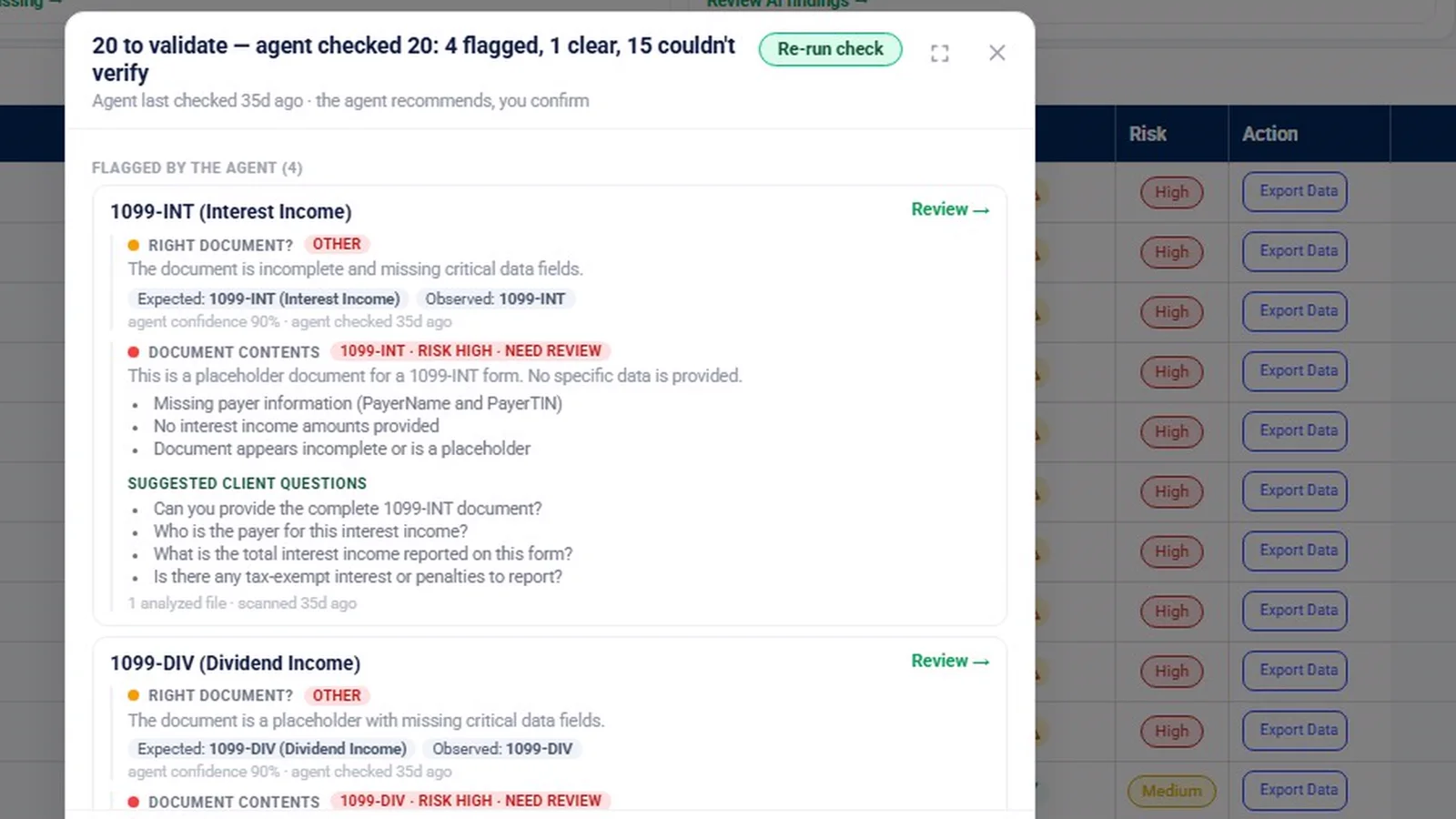
A finding shows what was expected against what was observed, what the document contains, suggested questions for the client and a confidence level. The demo finding in the video is on a placeholder 1099-INT file, and the finding says so. The agent only recommends. A person validates, questions, or leaves the item to validate, on the row or in bulk. The firm can also send a message from the review panel straight into that request’s chat, so a “Questioned” item comes with a reason the client can read.
AI-assisted output requires professional review and is not accounting, audit or tax advice. Extraction and classification can be wrong, which is why validating stays with your staff.
Drafted follow-ups for what is still missing
For missing items, a Chase agent drafts a follow-up naming what is outstanding. The card reads “Nothing here has been sent yet”. Someone at the firm can edit it, approve it and post it to the request chat as themselves, or delete it.
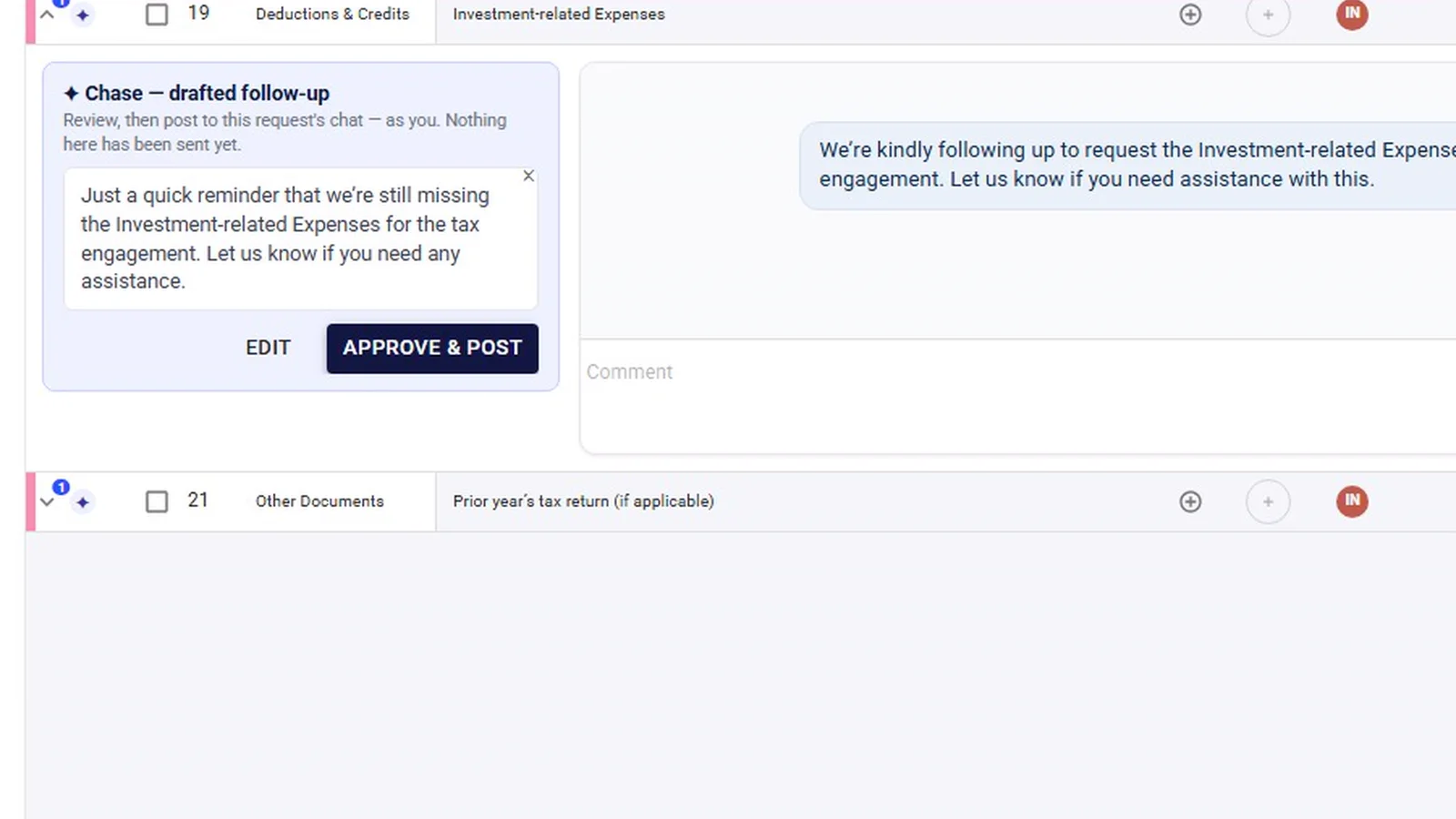
By default, drafts wait. Nothing goes to the client until a person approves it. A firm can choose to let an agent act on routine items on its own, and reminder emails sent that way are held for 15 minutes so they can be stopped. Flagged items always need a person. Your firm decides how much runs on its own; the AI agents page covers the settings.
The request list also has an Inflow Agent panel with shortcut prompts, such as what to work on next and drafting follow-ups for missing documents. The demo only hovers over this panel; its answers are not shown.
Collection across tax and audit
The same request list serves as the tax document checklist and the audit PBC list. A tax team collects W-2s, 1099s and K-1s on it; an audit team collects bank statements, aging reports and the trial balance on it. When a client uploads a trial balance to a request row, it can be analyzed from that row, which is how the financial workspace starts. Audit-specific request handling is covered on PBC request management, and K-1 timing on our K-1 collection guide.
Where the documents end up
Every request row links to that document’s folder in the engagement’s SharePoint (“Open folder in SharePoint”), so documents can live in the firm’s own SharePoint (see our Security page). Request counts feed the engagement overview (outstanding, to validate) and the home screen’s “Open Items” next action, so a manager sees where collection stands without opening every list. More on the Microsoft side is on the Microsoft 365 page.
What InflowSheet does not do here
- It does not send reminders on its own by default. Follow-ups are drafted for approval unless the firm opts an agent into autonomous mode for routine items.
- It is not a client questionnaire-style tax organizer. The Source Organizer rolls up figures from validated documents; it does not interview the client.
- It does not import client data from tax software such as CCH, UltraTax, Lacerte or Drake, and it does not e-file.
- There are no Outlook or OneDrive integrations; the conversation lives in the chat on each request row.
See it working
The walkthrough below follows one demo request list from attention cards to a drafted follow-up. For practical ways to cut down missing documents before tax season, read how to reduce missing client tax documents.
 Full walkthrough · 4:13 · access requiredClient document requestsOne request list per engagement: what came in, what is wrong with it, and what to send next.
InflowSheet is $10 per user per month, with every user getting the whole platform. See pricing.
Questions firms ask
How do I stop chasing clients for missing documents?
Start from one list per engagement so you can see what is missing without asking. In InflowSheet a Chase agent drafts a follow-up naming what is still outstanding, and someone at the firm edits it, approves it and posts it to the request chat. By default nothing goes to the client until a person approves it.
Does the software check that the client sent the right document?
A completeness agent compares each received document with the request and looks for the wrong type, wrong year or wrong entity. It shows expected against observed, a confidence level and suggested questions for the client. It only recommends; a person validates or questions the item.
Can we reuse last year's request list?
Yes. A list can be built from a previous engagement, a saved template, from scratch, or uploaded from an Excel template. When a client rolls into a new period, assignees carry forward and due dates move 12 months ahead, while chat, statuses and received files start fresh.
Is it only for tax season?
No. The same request list serves as the tax document checklist and the audit PBC list, so tax and audit teams collect the same way. The demo shown on this page is a tax engagement.
Where are the uploaded files stored?
Each request row links to its own folder in the engagement's SharePoint, so documents can live in the firm's own SharePoint (see our Security page). Engagement data is processed in InflowSheet's Microsoft Azure environment in the US East region.
What does it cost?
$10 per user per month, with every user getting the whole platform, including requests, review and signatures. See the pricing page for details.
Related
See InflowSheet on your own engagements
Start with the free 90-second tour, or request access and we will walk you through it.