How to organize audit PBC requests
A PBC list is the plan for the evidence your audit depends on. Here is how to structure it, run it through fieldwork and review, tie it to the file, and set up next year's list from this one.
Updated 2026-10-17
Knowing how to organize audit PBC requests is mostly knowing what the list is for. A PBC list is not a courtesy to the client or a to-do list for the senior. It is the plan for most of the information your audit evidence will be built on. When it is vague, late or out of date, fieldwork slows, the same item is asked for twice, and reviewers find gaps after the client has stopped answering.
This guide covers structure, statuses, owners and due dates, the review step, linking requests to the file, and turning this year’s list into next year’s. It ends with a template you can adapt.
What a PBC list has to do
AU-C 500 defines audit evidence as information used by the auditor in arriving at the conclusions on which the opinion is based, and it requires the auditor to evaluate the relevance and reliability of that information, including its source [1]. That evaluation should include whether the information is sufficiently precise and detailed for the auditor’s purposes, and obtaining evidence about its accuracy and completeness as necessary [1].
That has a practical consequence for how you write requests. “AR aging” is not a request. “Accounts receivable aging by customer as of 12/31/2025, exported from the billing system, with the report parameters visible, agreeing to the GL control account” is. The more specific the request, the less time you spend later establishing that what arrived is complete and comes from the right system.
A good PBC list does four jobs:
- Tells the client exactly what to produce, for what period, in what format and from what source.
- Shows both sides what is outstanding, and whether a delay sits with the client or the firm.
- Records review, so “received” and “accepted” are not confused.
- Connects each item to the workpaper it supports, so the file can be assembled and reviewed.
Structure: by cycle, by area, or by assertion
Most firms group requests by financial statement area or transaction cycle: cash, receivables and revenue, inventory, fixed assets, payables and expenses, payroll, debt and equity, plus a general section for governance and planning items. This matches how the client’s staff divide the work (the AP clerk owns the payables section) and how most audit files are indexed.
Organizing by assertion (existence, completeness, valuation and so on) is rarely helpful on the client-facing list. Clients don’t think in assertions, and one document often supports several. Keep assertions on the audit program, and give every request an area and a workpaper reference so you can see the link from either side.
A third axis is timing. Many firms split the list into a short planning list, an interim list, and the year-end fieldwork list. Within each, group by area.
| Grouping | Best for | Weakness |
|---|---|---|
| Financial statement area or cycle | Client ownership, file indexing | Cross-cutting items (minutes, contracts) need a general section |
| Assertion | Internal planning | Confusing for clients; items repeat |
| Timing (planning, interim, year-end) | Spreading the client’s workload | Needs a second grouping inside each phase |
Statuses that mean something
A status column that only says “received” hides the work that matters. Use a small, fixed set of states and define each one:
| Status | Meaning | Whose move |
|---|---|---|
| Requested | Sent, nothing received | Client |
| Received, to review | Something arrived; nobody at the firm has checked it | Firm |
| Questioned | Reviewed and not accepted; a question is open | Client |
| Accepted | Reviewed and accepted as responsive | Done |
| N/A | Not applicable this year, with a reason | Done |
The “whose move” column is the point. A controller who sees forty open items will assume the firm is slow; a partner who sees forty open items will assume the client is. Splitting “Requested” from “Received, to review” answers that argument with facts.
Owners and due dates
Every request needs two owners: the client contact who will produce it, and the firm staff member who will review it. One name for the whole list (“Controller”) does not work once the AP clerk, the payroll provider and the outside tax preparer are all involved.
Due dates should be staggered by area and agreed with the client. A single deadline for 120 items guarantees that the easy ones arrive first and the hard schedules arrive last. A workable pattern:
- Planning items (prior-year financial statements, minutes, new contracts) due first.
- Schedules the client prepares at close (reconciliations, account schedules) due shortly after close.
- Detail for sampling (invoices, support for selections) due after the firm sends selections, with a fixed turnaround.
Track the date each item was received, not just whether it was. That history is what you will use to set next year’s dates.
Review: from receipt to evidence
Review is where the PBC list becomes part of the audit file. AU-C 230 requires the auditor, in documenting procedures, to record who performed the work and the date it was completed, and who reviewed it and the date and extent of that review [2]. PCAOB AS 1215 says the same for issuer audits: documentation must show who performed the work, who reviewed it, and the date of such review [3].
For PBC items, a reviewer should check at least:
- Right document, right period, right entity. A 2024 bank statement for a 2025 audit is a common miss.
- Completeness. All pages, all accounts, all months; report totals agree to the trial balance.
- Source. System-generated or client-prepared, and whether the parameters are visible.
- Responsiveness. Does it answer what was asked, or does it raise a question?
If it fails, record a question on the item itself, not in a separate email thread, so the next reviewer can see why the item is still open.
Link requests to the evidence and the binder
Give every request the reference of the workpaper or lead schedule it supports, and file the accepted document where the workpaper can point to it. Then the list works in both directions: from a request you can find the workpaper, and from a workpaper you can see which client documents support it and whether any are still outstanding.
This pays off at the end. Under AU-C 230 the final audit file must be assembled no later than 60 days after the report release date, and after that documentation completion date nothing may be deleted or discarded before the end of the retention period, which may not be shorter than five years from the report release date [2]. AS 1215, as amended by the PCAOB, sets a shorter window for issuer audits: not more than 14 days after the report release date, down from 45 days, with the change phasing in by firm size for fiscal years beginning on or after December 15, 2024 or December 15, 2025. Retention is seven years [3]. A PBC list already tied to the binder index makes those windows routine rather than a scramble.
Setting up next year’s list
The best PBC list for next year starts from this year’s, edited deliberately:
- Copy the structure and requests, then clear every status, received date and file. Last year’s “Accepted” must not carry over.
- Move due dates to the new period and adjust any that were missed by a wide margin.
- Prune requests that were N/A or never used in a workpaper.
- Add requests for new accounts, new debt, new systems and anything raised in this year’s findings or management letter.
- Reassign owners where the client’s staff or your team has changed.
- Keep a short note of which items were late and why, and talk it through with the controller at planning.
Template
| Ref | Area | Request (what, period, format, source) | Client owner | Firm reviewer | Due | Received | Status | Workpaper ref | Notes / questions |
|---|---|---|---|---|---|---|---|---|---|
| C-1 | Cash | Bank reconciliations for all accounts, December 2025, PDF with bank statement attached | Controller | Senior | Jan 20 | Requested | C.1 | ||
| AR-2 | Receivables | AR aging by customer as of 12/31/2025, system export with parameters, agreeing to GL | AR lead | Staff 1 | Jan 20 | Requested | AR.2 | ||
| FA-1 | Fixed assets | Fixed asset schedule FY2025: opening balance, additions, disposals, closing balance, Excel | Controller | Staff 2 | Jan 27 | Requested | FA.1 | ||
| D-1 | Debt | Loan agreements and amendments signed in FY2025 | CFO | Senior | Jan 13 | Requested | D.1 | ||
| G-3 | General | Board and committee minutes for FY2025 and through report date | CFO | Manager | Jan 13 | Requested | A.3 |
Running the PBC list in InflowSheet
Spreadsheets work until fieldwork starts. One option is to run the list in a tool where the client answers each item directly. In InflowSheet, the request list serves as the PBC list, one list per engagement and period. A list can come from a saved template or be uploaded from an Excel template, in column or matrix form.
- Rows grouped into sections, showing the document requested, who it is assigned to, whether it was received, its review state and its status, with a risk rating on each request.
- Review states: Missing, To validate, Questioned, Validated and N/A, so “missing” and “waiting for the firm to validate” are different states. Attention cards (To Validate, Missing, Needs Review) filter the table.
- A conversation on every row, with @mentions, so questions stay with the item.
- A completeness check that only recommends. It compares what arrived with what was requested (wrong type, wrong year, wrong entity) and a person validates or questions it.
- Follow-ups drafted for approval. For missing items, a Chase agent drafts a follow-up; nothing goes to the client until someone approves it.
- Links into the file. Each row links to its SharePoint folder, and the same engagement carries the Evidence page, the firm’s own audit program and a binder indexed A–G that shows what isn’t filed yet.
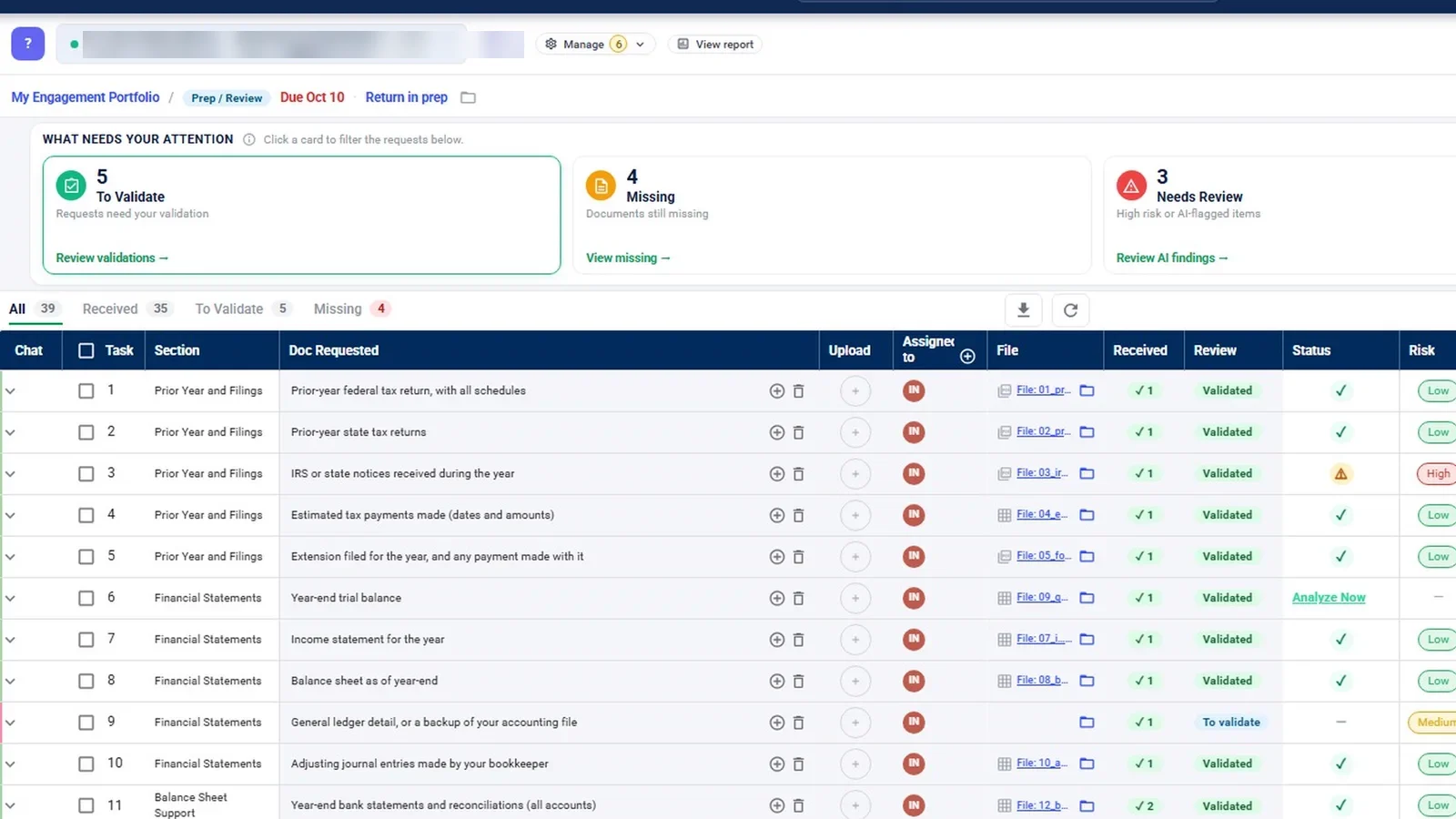
What it does not do: there is no risk-assessment module, and the next-year steps above are a process for your team to run; this guide does not describe them as an InflowSheet feature. The demo workspace contains tax engagements only, so audit screens were filmed inside a tax engagement. More on the PBC request management and audit evidence management pages, and in the evidence, programs and binder walkthrough. Pricing is on the pricing page.
 Full walkthrough · 4:13 · access requiredClient document requestsOne request list per engagement: what came in, what is wrong with it, and what to send next.
Checklist
- Every request names the period, format and source.
- Requests are grouped by area, with a workpaper reference on each.
- Each item has a client owner, a firm reviewer and its own due date.
- Statuses separate “waiting on the client” from “waiting on us”.
- Review is recorded on the item, with who and when.
- Accepted items are filed where the workpaper and binder can reach them.
- Next year’s list starts from this year’s, with statuses cleared and lessons noted.
For the tax-season version of the same problem, see how to reduce missing client tax documents.
Questions firms ask
What is a PBC list in an audit?
It is the list of schedules, reports and documents the auditor asks the client to supply, such as bank reconciliations, aging reports, debt agreements, fixed asset schedules and board minutes. Each item supports a specific part of the audit and should say what period, format and source is expected.
Does PBC mean prepared by client or provided by client?
Both expansions are in common use and refer to the same list. Prepared by client fits schedules the client builds; provided by client fits documents they simply hand over. The distinction matters less than making each request specific.
Should a PBC list be organized by cycle, by account or by assertion?
Most firms organize by financial statement area or cycle, because that matches how the client's staff divide the work and how the audit file is indexed. Assertions are better tracked on the audit program; tagging requests with the area and the workpaper reference gives you both views.
When should the PBC list go to the client?
Send a short planning list early and the main fieldwork list with enough lead time for the client to prepare schedules, with due dates staggered by area. Agree the dates with the controller rather than setting one deadline for everything.
Is there a PBC list template in Excel?
Yes, and a spreadsheet is a fine starting point. The template table in this guide shows the columns that matter. The limits show up during fieldwork, when versions multiply and the status in the workbook drifts away from what actually arrived.
Sources
- AICPA: Statements on Auditing Standards currently effective, AU-C 500 Audit Evidence (par. .06–.08) (retrieved 2026-10-17)
- AICPA: Statements on Auditing Standards currently effective, AU-C 230 Audit Documentation (par. .06, .09, .16–.17) (retrieved 2026-10-17)
- PCAOB: AS 1215, Audit Documentation (retrieved 2026-10-17)
Related
See InflowSheet on your own engagements
Start with the free 90-second tour, or request access and we will walk you through it.