Audit evidence management software, on the same engagement as the trial balance
Mark each lead schedule line as supported or not, run your firm's own audit program with two signatures per step, and assemble the binder by index, all next to the trial balance it supports.
Updated 2026-10-17
Most small and mid-sized audit practices manage evidence in two places at once: a folder tree of PDFs and a workbook that says which PDF supports which balance. The link between the two is a file name and a cell comment. When a number moves late in fieldwork, nobody can say with confidence which tickmarks still hold. When the reviewer asks who performed a step, the answer is initials typed into a column.
Audit evidence management software should keep the evidence, the number and the sign-off together. In InflowSheet, evidence, the audit program and the binder sit on the same engagement as the trial balance, so the support for a line is recorded against that line rather than in a parallel document.
Evidence marked against lead schedule lines
On the Evidence page, staff pick a lead schedule and a source document. Each line is then marked with one of four states: Supported, Derived, No evidence or Exception. Coverage is visible as you go, because unevidenced lines are counted. A reviewer can see at a glance how much of a schedule still has nothing behind it.
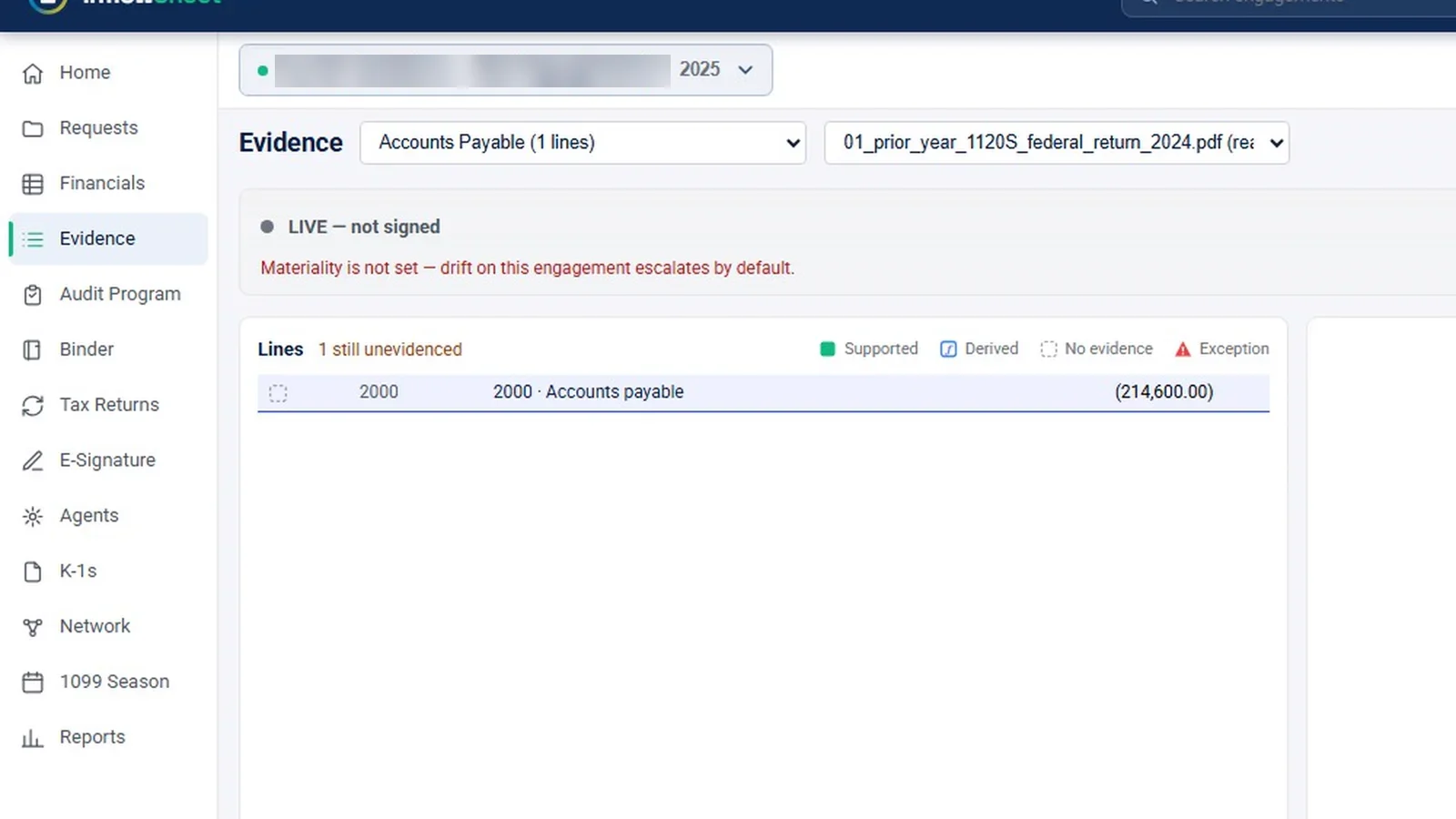
Snips that support each line are drawn on the source PDF or sheet. The demo has a single evidence line and no snips, so snip drawing is not shown in the video. The Evidence page has its own sign-off, “Pin & sign” as preparer and “Sign as reviewer”, and it warns when materiality isn’t set. Confirmations, such as a bank confirmation marked “Sent, awaiting reply”, are tracked on the same page.
Because the lead schedules come from the trial balance workspace, the evidence is attached to the same mapped accounts the team adjusted and tied out. Lead schedules carry their own preparer and reviewer sign-off and are marked for re-review if a number changes after sign-off.
Your firm’s audit program, not ours
InflowSheet does not ship a methodology. The audit program is the firm’s own. The firm uploads its program document and InflowSheet parses it into sections and steps. A person checks the parse; the app calls this “deliberately not automatic”. The program goes live only when someone clicks “Make it live”.
A firm program library holds the firm’s programs. “Start from this” brings a program into an engagement as a draft to check, and “Retire” takes an outdated one out of use.
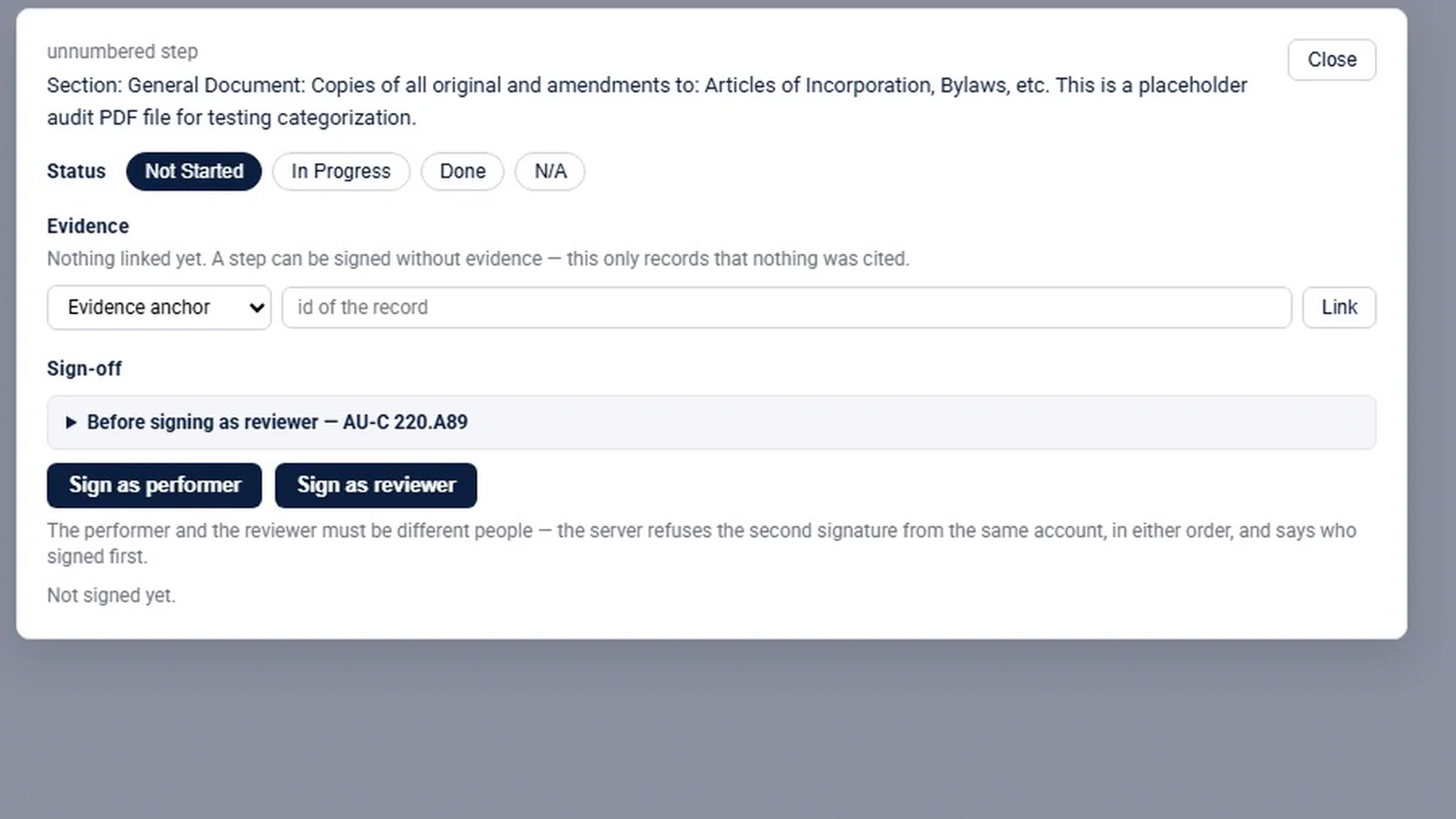
Two signatures per step, two different people
Each program step has a status, evidence links, and two signatures: performer and reviewer. They must be different people, and neither signature is applied automatically. A step can be signed without evidence; InflowSheet records that nothing was cited, so the gap is on the record rather than hidden. Progress counts closed and N/A steps.
A step turns red when evidence it cites stops agreeing, so a late change to a balance shows up on the steps that relied on it.
The binder, assembled by index
The Binder assembles the file by index, in sections A to G:
| Section | Contents |
|---|---|
| A | Planning, risk and materiality |
| B | TB and adjustments |
| C | Leads and tie-outs |
| D | Evidence and confirmations |
| E | Program |
| F | Findings |
| G | Reports and sign-offs |
The binder shows what isn’t filed yet, and a memo or PDF can be added for paper the product didn’t produce, such as a planning memo written elsewhere.
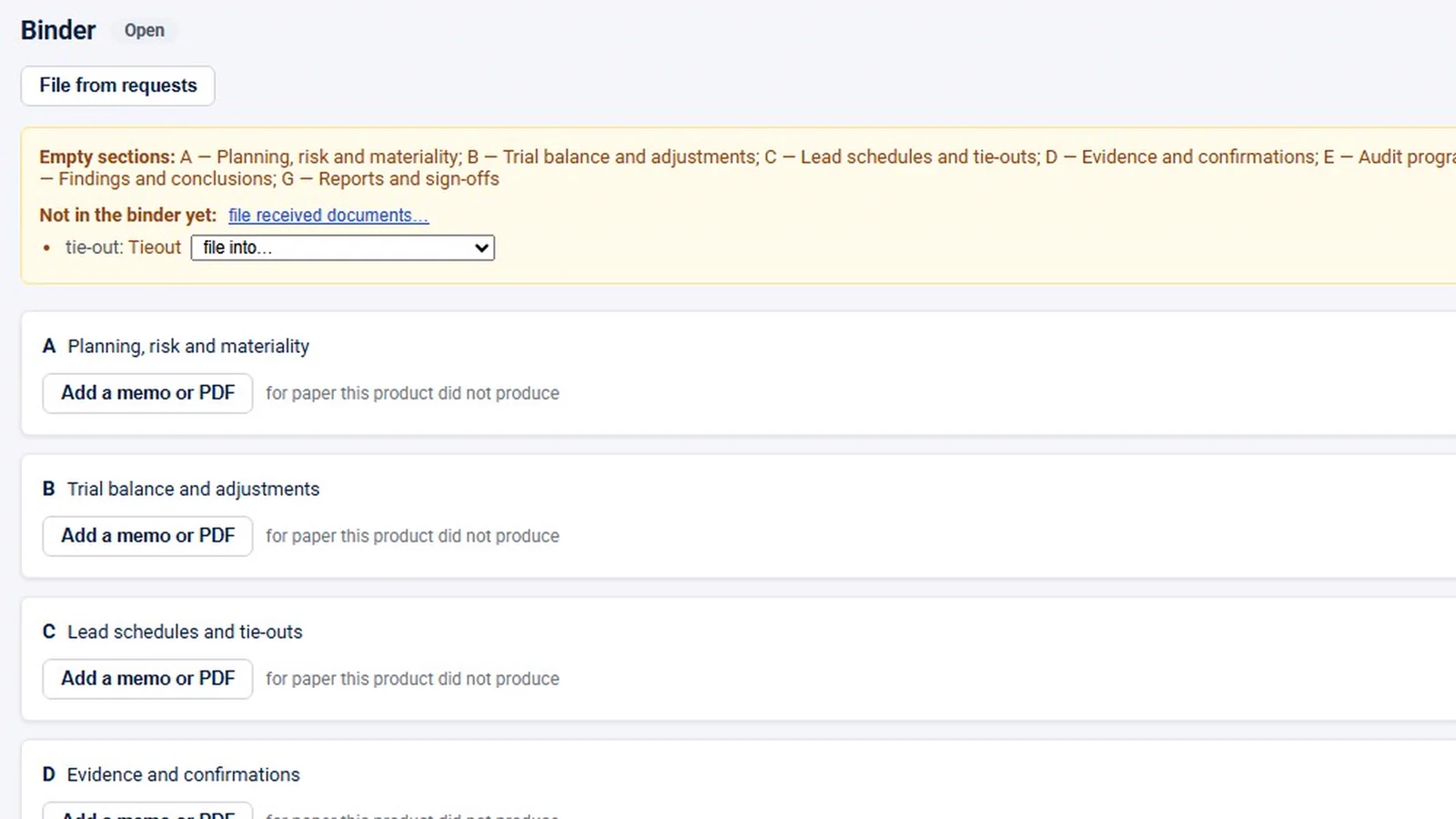
All binder sections are empty in the demo. The demo workspace has no audit-type engagement, so the walkthrough was filmed inside a tax engagement with one evidence line and a one-step placeholder program. What you see is the structure, not a completed file.
Locking the file
The app includes a lock for the audit file. Locking starts the AU-C 230 assembly window: every indexed workpaper is hashed and signed, and documents are copied to write-once storage. There is no unlock, and addenda are still allowed. The lock was never clicked in the demo, so treat this as described by the app rather than demonstrated.
How a reviewer works through it
A reviewer coming to a file cold does not have to open every workpaper to find the gaps. The order of a typical review pass looks like this:
- Start at the review console. It lists the open decisions: unmapped accounts, variances still needing commentary, and lead schedules not yet reviewed, each with a link.
- Check coverage on Evidence. The count of unevidenced lines shows where support is thin, and lines marked Exception stand out from the Supported ones.
- Read the program steps. A red step means the evidence it cites stopped agreeing. A step signed with nothing cited says so. The performer’s signature is already there; the reviewer adds theirs, and the step dialog states that performer and reviewer must be different people.
- Look at the binder warning. It lists the sections with nothing filed, so the file’s gaps are visible before anyone talks about locking it.
The review console ties it together
The Financial Review Console lists the decisions still required before sign-off: unmapped accounts, variances needing commentary, lead schedules not reviewed. Each links to where it gets fixed. The console has no sign-off of its own. Sign-off happens where the work is: on tie-outs, lead schedules, evidence and the audit program.
Who sees what is set by role and engagement type. Audit staff get Financials, Evidence, Audit Program and Binder, and do not get Tax Returns, K-1s or 1099 Season. On consulting engagements, Evidence, Audit Program and Binder are hidden.
What InflowSheet does not include
Being clear about scope saves an evaluation:
- No risk-assessment module. There is no formal audit risk-assessment workflow. Risk appears only as request risk ratings and as the label on binder section A.
- No financial-statements module. InflowSheet does not draft or generate financial statements.
- No roll-forward of workpapers or the binder. Request lists roll into a new period, and mappings carry forward between imports; a year-end roll-forward of the audit file is not part of the product.
- No bundled methodology. You bring your own program.
For how client support gets into the file in the first place, see PBC request management. For a tool-neutral approach, read how to organize engagement documentation.
Watch evidence, programs and the binder
This walkthrough covers the Evidence page, the firm program library, performer and reviewer sign-off and the binder index, and it states plainly that there is no risk module.
 Full walkthrough · 3:02 · access requiredEvidence, programs and binderEvidence by lead schedule line, your own audit program with two signatures, and a binder indexed A to G.
InflowSheet is $10 per user per month, with the trial balance, evidence, audit program and binder included for every user. See pricing.
Questions firms ask
What is an audit evidence management system?
It is software that records which evidence supports which balance, who prepared and reviewed it, and where it sits in the audit file. In InflowSheet that means evidence marked against lead schedule lines, program steps with performer and reviewer sign-off, and a binder indexed A to G.
How should we organize audit evidence instead of Excel?
Organize it against the numbers it supports. In InflowSheet you pick a lead schedule and a source document and mark each line Supported, Derived, No evidence or Exception, and unevidenced lines are counted so gaps are visible.
Can we use our own audit program?
Yes. The firm uploads its program document and InflowSheet parses it into sections and steps. A person checks the parse and the program goes live only when someone clicks Make it live. Programs are kept in a firm library.
Does InflowSheet include risk assessment?
No. There is no formal risk-assessment module. Risk appears as a rating on each request and as the binder section label for planning, risk and materiality.
Can the audit file be locked?
The app includes a lock that starts the AU-C 230 assembly window, hashes and signs every indexed workpaper and copies documents to write-once storage, with addenda still allowed. It was not demonstrated in the demo.
Related
See InflowSheet on your own engagements
Start with the free 90-second tour, or request access and we will walk you through it.