Trial balance software for CPA firms
Import the trial balance into the engagement, map every account with the reason in view, write variance commentary, roll up lead schedules and tie out balances, then review what is still open in one console.
Updated 2026-10-17
Trial balance work in most firms happens in a spreadsheet that one person understands. The client’s export gets pasted in, accounts get coded to groupings by hand, someone writes variance explanations in a column, and the lead schedules are formulas pointing at a tab that may or may not be the latest version. Review is a manager scrolling for yellow cells. When the client sends a revised TB, the mapping work starts again.
Trial balance software for CPA firms should keep the TB versioned, make mapping decisions visible and reviewable, and tell the reviewer what is still open. In InflowSheet the trial balance lives inside the engagement, in the Financial Workspace, next to the request list it came from and the evidence that will support it.
Import, version and foot
Each TB import is a new version (“Import new version”), and InflowSheet checks that it foots; a TB that doesn’t is marked “DOES NOT FOOT”. A trial balance can be imported from a file, or from QuickBooks Online once the client’s company is connected through Intuit’s consent screen. A TB the client uploads to a request row can be analyzed from that row (“Analyze Now”), and importing a TB received on the engagement is what activates the financial workspace.
The TB table shows account, name, unadjusted, adjustments, adjusted, prior and variance, with mapping and review status on every line. Links from the table lead to Map accounts, Adjustments, Variance, Anomalies, Tie-Outs and Lead Schedules.
Trial balance mapping with the reason shown
InflowSheet proposes a mapping for every account and shows why it proposed it. It raises flags where a person should look: a weak match that fell back to a catch-all bucket, or a balance whose sign is opposite the normal balance for that grouping.
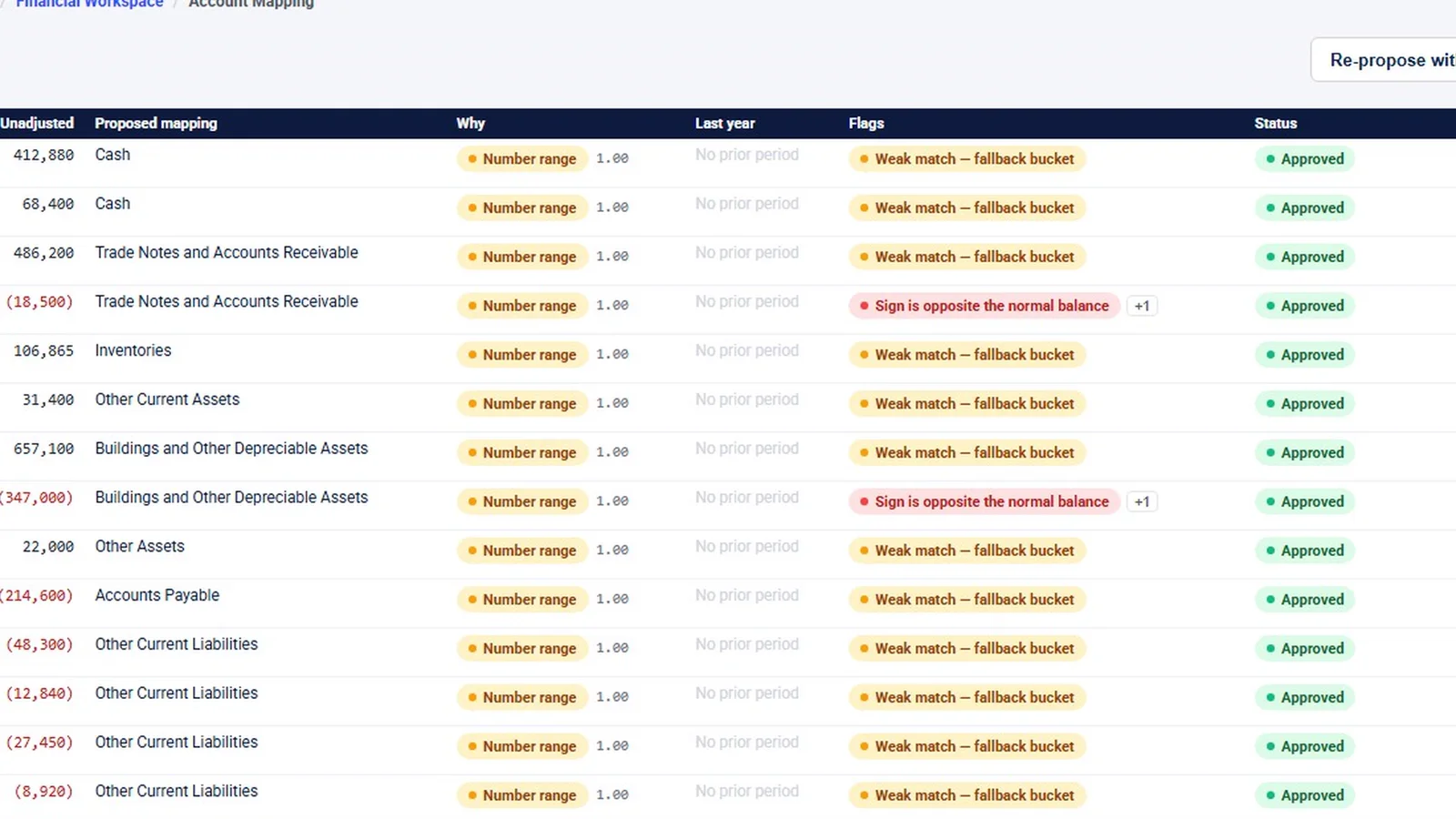
Rows with no flags can be accepted in one pass (“Accept all with no flags”). Flagged rows are decided one at a time, and rejecting a mapping takes a reason. Mapping progress is shown as a percentage and a count of accounts mapped, and unmapped accounts become open decisions in review. The proposals come from “Propose / Re-propose with AI” on the same page.
Mappings carry forward between imports. When the client sends a revised TB, the previous decisions come with it, and a carried-forward mapping is marked as not reviewed this time, so nobody mistakes last month’s approval for today’s.
Variance analysis and commentary
Variance analysis flags period-over-period movement. It warns when there is no approved materiality or no prior period, rather than silently comparing against nothing. In the demo every account reads “new”, because no prior period is loaded.
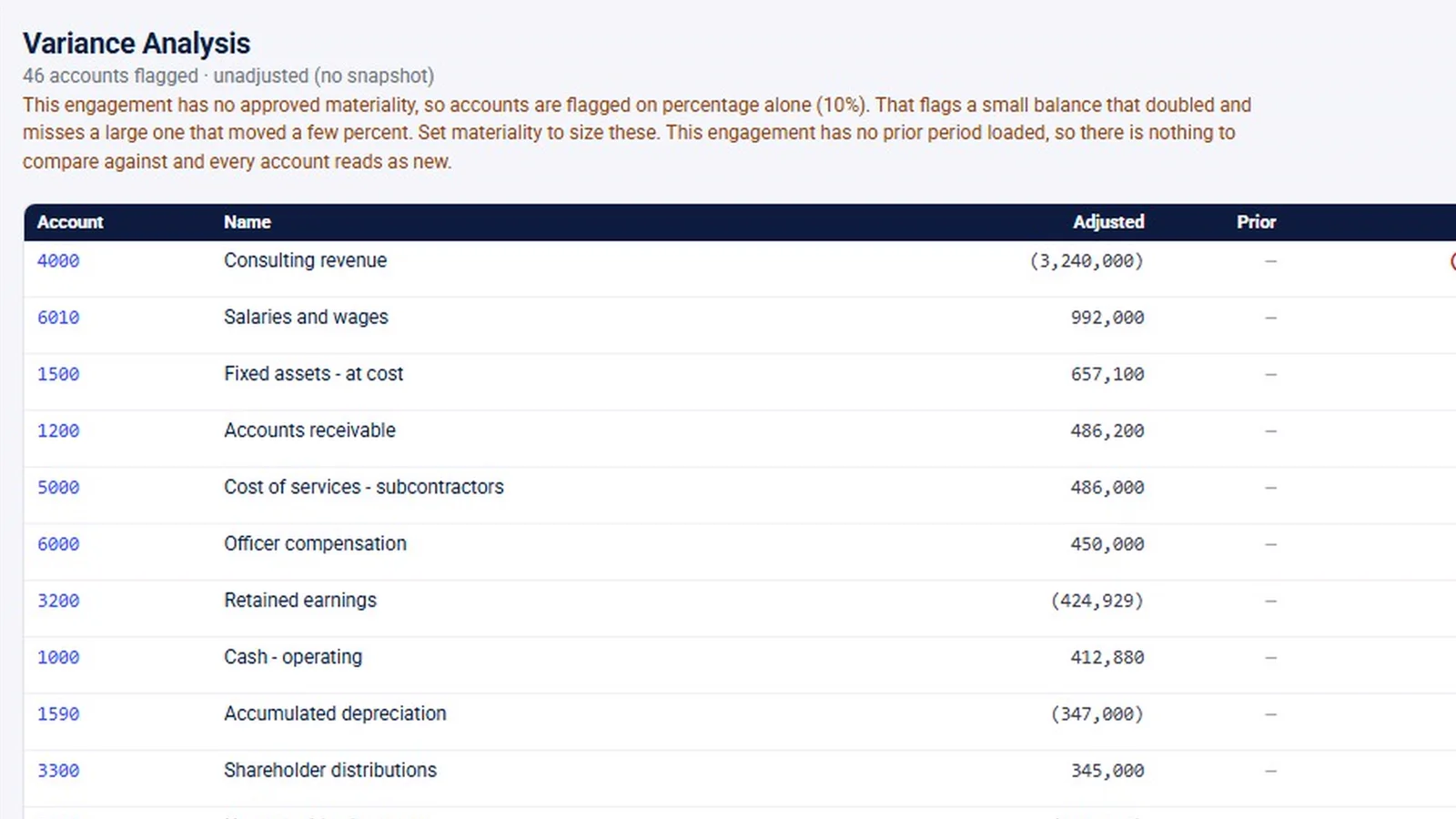
Commentary is written on the account. “Draft all with AI” writes variance commentary as drafts for a person to edit and approve, and each account also has its own “Add commentary” button for the explanations staff write themselves. AI-assisted output requires professional review and is not accounting, audit or tax advice.
Anomaly detection runs over the imported TB. Findings carry a severity, and dismissing one takes a reason. In the demo it was never run, so the page is empty.
Adjustments, tie-outs and lead schedules
Adjustments are balanced draft entries that someone approves before they post. Approved entries are materialized into a versioned adjusted snapshot. The demo has no entries, so only the buttons are visible.
Tie-outs reconcile balances to outside amounts, such as a bank confirmation. An automatic TB foot tie-out (total debits equal total credits, marked “Tied”) is built in, and tie-outs can be linked to the lead schedules they support.
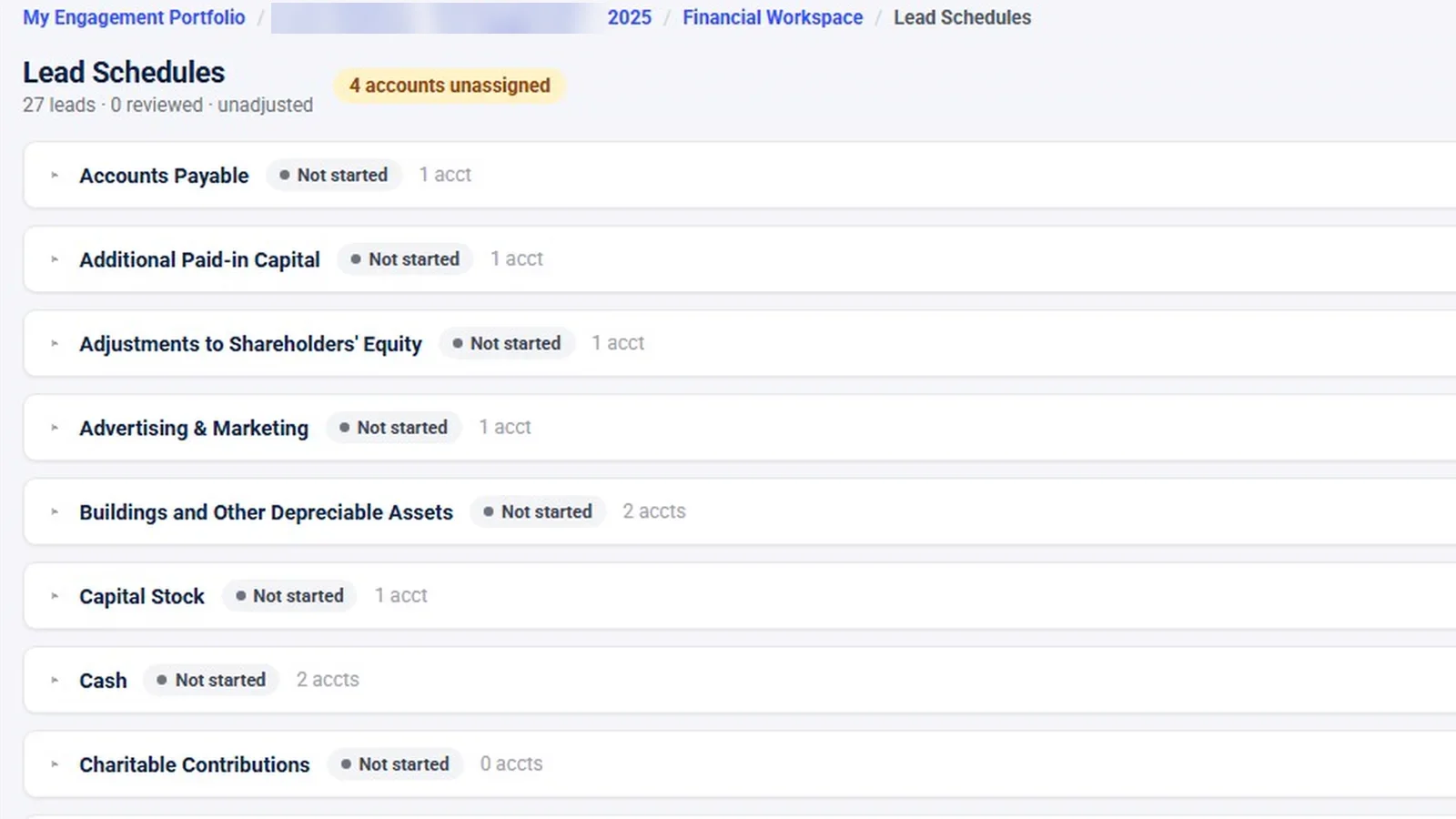
Lead schedules roll mapped accounts up by grouping: cash, accounts payable, capital stock, insurance and so on. Each lead has a preparer and a reviewer sign-off and is marked for re-review if a number changes after sign-off. Accounts that aren’t assigned to any lead are flagged.
The Financial Review Console
The Financial Review Console lists the decisions required before the financials are done: unmapped accounts, variances needing commentary, lead schedules not reviewed. Each item links to where it gets fixed. The console has no sign-off of its own. Sign-off happens where the work is: on tie-outs, lead schedules and the audit program. The trial balance review workflow guide walks through using a console like this in practice.
The same numbers appear on the engagement overview: TB version, percentage mapped, open findings, pending adjustments and variances needing commentary. A manager can see where the financials stand without opening them.
When the client sends a revised TB
The second version of a trial balance is where spreadsheet workflows usually break, so it is worth following one through:
- Import it as a new version. InflowSheet checks that it foots before anyone works on it.
- Mappings from the earlier import carry forward, each marked as not reviewed this time. Any account still unmapped shows up as an open decision in the review console.
- Accept the unflagged proposals in one pass and decide the flagged ones individually, giving a reason for any rejection.
- Any lead schedule whose numbers changed after sign-off is marked for re-review, so the preparer and reviewer know exactly which leads to look at again.
- Variances that now need commentary appear in the console until someone writes or approves the explanation.
Who uses it
The Financial Workspace sits on tax and audit engagements alike. Financials access is given to the Admin, Tax and Audit roles; Consulting and Client users do not have it. A tax team uses the mapping for return preparation. An audit team carries the lead schedules on into evidence, the audit program and the binder, and gets its source TB through the PBC request list.
What it does not do
- No financial-statements module. InflowSheet does not draft or generate statements.
- No year-end roll-forward of workpapers or adjustments. Mappings carry forward between imports, and request lists roll into a new period; nothing beyond that rolls.
- No tax-software integration. Mapped balances are not pushed into CCH, UltraTax, Lacerte or Drake.
- The demo is thin in places. It was filmed inside a tax engagement with no prior period, no adjustments and no anomaly run. The 91% mapped and 27 leads in the screenshots are demo data, not results.
Watch the Financial Workspace
The walkthrough covers TB import and versions, AI-proposed mapping, variance and commentary, tie-outs, lead schedules and the review console.
 Full walkthrough · 3:59 · access requiredTrial balance and analysisTB import and versions, account mapping, variance commentary, tie-outs and lead schedules in one workspace.
The trial balance module is included in the one price: $10 per user per month, with every user getting the whole platform. See pricing.
Questions firms ask
How do I map a trial balance without re-keying?
Import the TB from a file or from QuickBooks Online and InflowSheet proposes a mapping for every account, with the reason and any flags shown. Unflagged rows can be accepted in one pass, and mappings carry forward to the next import marked as not reviewed this time.
Can the TB come straight from the client's books?
A TB can be imported from QuickBooks Online once the client's company is connected through Intuit's consent screen, or from a file. A TB the client uploads to a request row can be analyzed from that row.
Does AI write the variance explanations?
Draft all with AI writes variance commentary as drafts that a person edits and approves, and each account also has its own Add commentary button. AI-assisted output requires professional review.
Who signs off the trial balance work?
Sign-off happens where the work is: on tie-outs, lead schedules, evidence and the audit program. Each lead schedule has a preparer and a reviewer sign-off. The review console lists what is still open but has no sign-off of its own.
Does it produce financial statements?
No. InflowSheet has no financial-statements module. It covers mapping, variance analysis, adjustments, tie-outs, lead schedules and review on the engagement.
Related
See InflowSheet on your own engagements
Start with the free 90-second tour, or request access and we will walk you through it.