What to evaluate when replacing a CPA client portal
Most firms replace a client portal because of something specific: clients who will not log in, files stranded outside the firm's document system, or a portal that stops at the upload. This checklist helps you test the replacement against the problem you actually have.
Updated 2026-10-17
Replacing a CPA client portal is a bigger decision than it looks. The portal is the one piece of firm software every client touches, it holds years of documents, and it sits in the middle of tax season deadlines. Firms usually start looking for a replacement because of one painful symptom. Clients forward the notification email instead of logging in. Files live in the portal and never make it into the firm’s document system. Staff still track what is missing in a spreadsheet, because the portal only knows what was uploaded, not what was asked for.
Write that symptom down before you look at any vendor. Then test every option against the checklist below. It is vendor-neutral on purpose. Our own answers are in a separate section at the end.
1. Where documents are stored, and who owns them
Ask two separate questions: where do the files live, and where does the vendor’s data about them live?
- File location. Some portals store files in the vendor’s own cloud storage. Others write them into the firm’s document system, such as SharePoint. Neither is automatically right, but it decides who controls retention, search, legal hold and backup.
- Application data. Even a portal that writes files to your storage keeps its own records: request lists, statuses, messages, audit logs. Ask where those are processed and stored, and in which region.
- Exit. Ask what you get back when you leave, in what format, and how long it takes. Under Circular 230, a practitioner must promptly return client records that the client needs for federal tax obligations when asked [5]. Your portal’s export has to make that possible years from now.
2. Fit with Microsoft 365
If your firm runs on Microsoft 365, the portal either works with it or becomes a second system to govern.
- Sign-in. Can staff sign in with their Microsoft accounts, so your identity policies apply? Conditional Access policies are “if-then statements”: if a user wants to access a resource, then they must complete an action, such as multifactor authentication [2]. A portal that uses its own passwords sits outside those rules.
- Permissions requested. Ask exactly which Microsoft permissions the vendor needs, whether an administrator consents to them, and how to revoke them.
- External sharing. If the portal relies on SharePoint sharing, understand your tenant settings. SharePoint has organization-level and site-level sharing settings, and where they differ “the most restrictive value always applies” [1]. Microsoft also notes that external sharing is on by default for the whole environment [1].
- Teams. If your staff already talk with clients in Teams, ask how the portal relates to those teams and channels, and whether it expects them to exist or creates its own.
3. Request lists, not just uploads
The difference between a portal and a collection system is the request list. Without one, the portal can tell you what arrived but not what is missing.
- Can you build a list per engagement and period, from last year’s list or a template?
- Can a client upload straight onto the item, from a phone if needed?
- Does each item have a status beyond “uploaded”, such as checked, questioned, or accepted?
- Is there a conversation on each item, so a question about the 1099-B stays with the 1099-B?
- What happens after the upload: does someone review the document before it counts as received?
- How do follow-ups work? Are reminders sent automatically, drafted for approval, or left to staff?
4. E-signature and identity verification
Signatures are where portals differ most, and where fees often hide.
- Which documents. Engagement letters, Forms 8879, representation letters, consents. Ask how each is routed.
- Signing order. Who signs first? For an engagement letter, many firms want the partner to approve before the client sees it. For a return, Publication 1345 requires the taxpayer to sign and date Form 8879 before the ERO originates the electronic submission [3]; ask where the ERO’s own signature falls in the vendor’s flow.
- Identity verification. For remote electronic signatures on individual e-file authorizations, Publication 1345 says the ERO must record the taxpayer’s name, Social Security number, address and date of birth, and verify them through record checks or similar databases [3]. Ask how the vendor’s flow meets this, whether it can be required by firm policy, and what it costs per signer.
- Where the signed copy goes. Into the engagement folder automatically, or into a download someone has to file?
5. Support for audit and review work
If the firm does attest work, a tax-only portal leaves the PBC list in a spreadsheet.
- Can the same request list serve as a PBC list, with items assigned to client contacts?
- Can received documents be linked to the workpapers they support?
- Does the system record who did what and when? AU-C 230 requires audit documentation to show who performed and who reviewed the work, with dates [6]. A portal’s activity log is not a substitute for workpapers, but it should not contradict them.
6. The client’s experience
The best portal is the one clients use. Test it as a client would, on a phone.
- How does a client get in the first time: an invitation, a password, a code by email?
- Is there one clear screen of what they still owe and what needs their signature?
- Can they take a photo of a document and upload it?
- How many steps does it take to sign a Form 8879?
- What does the client see when they are done? A confirmation matters more than it sounds.
7. Permissions and staff roles
- Can access be limited by engagement, so seasonal staff see only their clients?
- Are tax and audit staff given different tools?
- Is signing authority (who can act as ERO, who signs letters) set separately from access?
- Can an administrator see who can reach which clients?
- Does the vendor support your security obligations? IRS Publication 4557 says that under the FTC Safeguards Rule, tax return preparers must create and enact security plans to protect client data, and that the plan must include multi-factor authentication for anyone accessing customer information on the firm’s system [4].
8. Migration
- What moves. Closed engagements often stay in the old system until retention ends; open ones and permanent files move.
- Request lists. Can you load your existing checklist or PBC template, for example from Excel?
- Timing. Switch between seasons. Run the first season with a small group of engagements if you can.
- Clients. Plan one clear message to clients explaining the change and what they will see.
9. Pricing model
- Unit. Per user, per client, per envelope, per module, or a mix.
- What is extra. E-signature, identity verification, storage, additional modules.
- Who counts. Do client logins count as users?
- Growth. Model the price at your current size and at the size you plan to be in three years.
The client portal replacement checklist on one page
| Area | Questions to ask every vendor | Your answer |
|---|---|---|
| Storage and ownership | Where do files live? Where is application data processed and stored? What do we get back on exit? | |
| Microsoft 365 fit | Microsoft sign-in and Conditional Access? Which permissions, consented by whom, revocable how? | |
| Request lists | Per engagement and period? Built from last year? Statuses beyond uploaded? Chat per item? | |
| Follow-ups | Sent automatically, drafted for approval, or manual? | |
| E-signature and KBA | Signing order for letters and 8879s? Identity verification for remote signers? Per-signer cost? | |
| Audit support | PBC lists? Evidence linked to workpapers? Who-did-what records? | |
| Client experience | First sign-in, phone upload, one list of what is owed, steps to sign | |
| Permissions | Access by engagement? Role-based tools? Signing authority separate from access? | |
| Migration | Import of templates and lists? What stays behind? Timing? | |
| Pricing | Unit, extras, whether client logins count, price at three-year size |
How InflowSheet answers this checklist
This section describes InflowSheet, the engagement platform we build. These are our answers to the questions above, with what we do not do stated alongside.
- Storage and ownership. Documents can live in the firm’s own SharePoint: each request has its own SharePoint folder, and signed documents are filed into the engagement’s folders. InflowSheet processes and stores engagement data in its Microsoft Azure environment in the US East region (see our Security page).
- Microsoft 365 fit. Users sign in with Microsoft, after a Microsoft 365 Global Admin grants consent once. Sign-in uses Entra ID with the firm’s SSO, MFA and Conditional Access policies, and the Microsoft permissions are admin-consented and revocable (see our Security page). InflowSheet works with the Teams channels the firm creates or links; each engagement is tied to a private team, a private channel and a period. More detail is on the Microsoft 365 page.
- Request lists. Each engagement and period has one request list, which serves as both the PBC list and the tax document checklist. Lists can be built from a previous engagement, a saved template or from scratch, or uploaded from an Excel template. Review states are Missing, To validate, Questioned, Validated and N/A, and every row has its own chat thread.
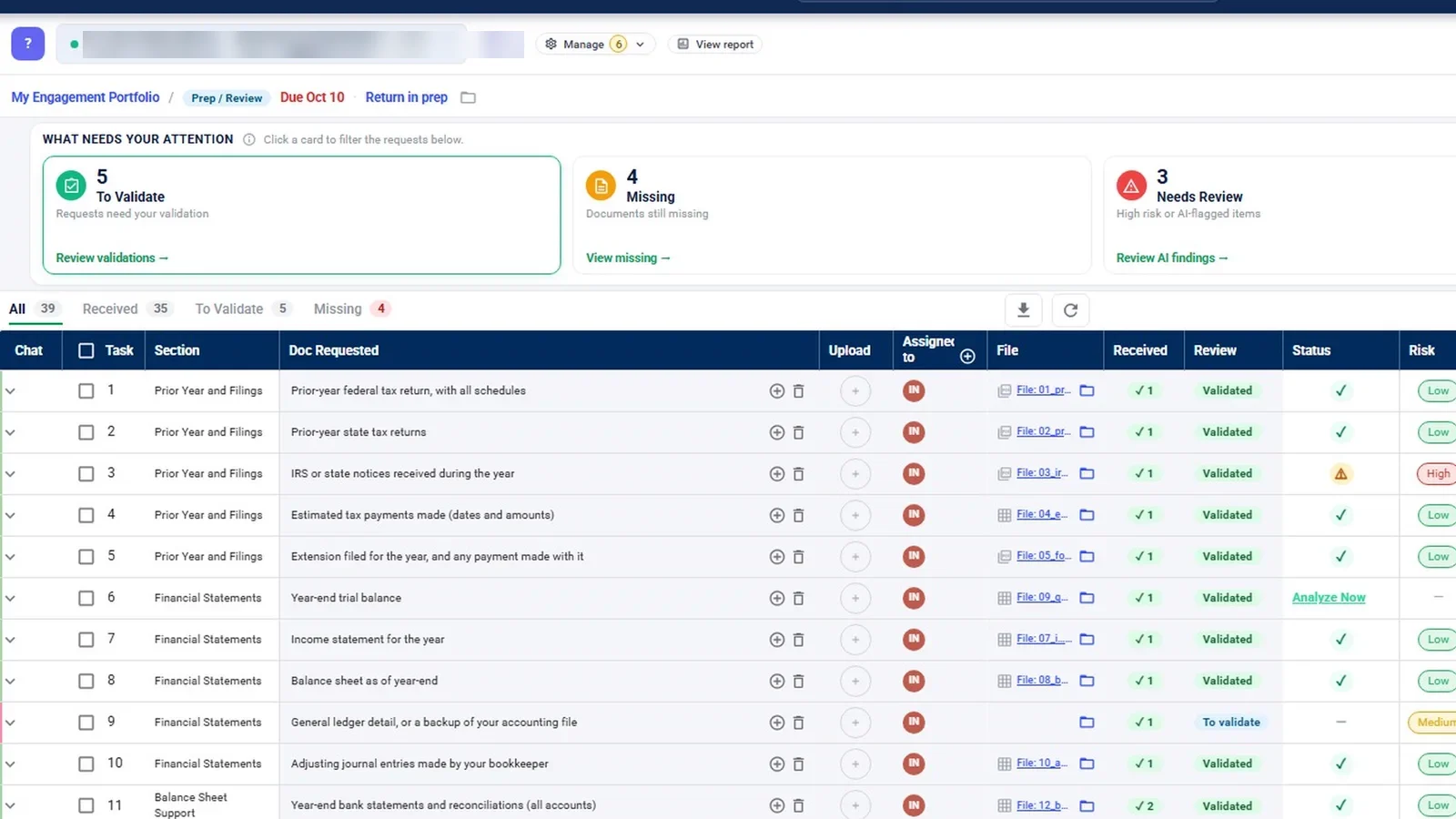
- After the upload. A completeness agent compares each received document with what was requested, but the agent only recommends; a person validates. A Chase agent drafts follow-ups for missing documents, and by default nothing goes to the client until someone approves it. Firms can opt in to autonomous sending for routine items only, with a 15-minute hold.
- E-signature and KBA. DocuSign is the signing engine. Engagement letters are signed by the partner first, then go to the client exactly as reviewed. Returns are signed by the client first (Form 8879), then by the assigned ERO, and a return cannot start its signature flow until an ERO is assigned. A firm setting, “Tax Return KBA”, requires DocuSign knowledge-based authentication for client signers on tax returns.
- Audit support. Evidence, the firm’s own audit program and the binder sit on the same engagement as the trial balance. The demo contains only tax engagements, so the audit screens were filmed inside one.
- Client experience. Clients come in by invitation. They see the request list as “My Documents”, with cards for Documents You Still Owe and Awaiting Your Signature, and can drag and drop up to 30 files at 10 MB each or take a photo with a phone camera.
- Permissions. Staff roles are Tax, Audit and Consulting, plus Admin and Client, and the navigation adapts to the role and the engagement type. An entity access view shows who can reach which clients. Signing authority is set separately from access: an administrator marks which Tax-role users can act as ERO and which staff sign engagement letters.
- Migration. We do not publish a migration tool. Request lists can be uploaded from Excel templates, and a file dropped into an engagement period’s SharePoint folder appears in InflowSheet on the next refresh. Ask us how your existing files would move.
- Pricing. $10 per user per month, with no modules and no add-ons; every user gets the whole platform (pricing). We have not published billing terms beyond that, so ask about anything else, including how client logins are treated.
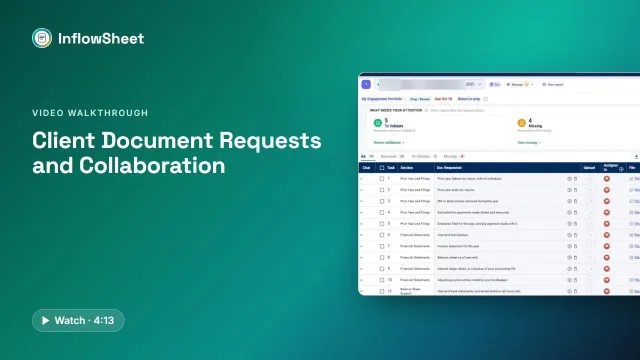 Full walkthrough · 4:13 · access requiredClient document requestsOne request list per engagement: what came in, what is wrong with it, and what to send next.
What InflowSheet does not do. It does not e-file returns, does not integrate with tax preparation software, and has no billing, invoicing or time tracking. If those are the reason you are replacing your portal, a practice management suite may be the better fit. For the portal itself, see client portal and client document collection; for the Microsoft side, see SharePoint for accounting firms.
Questions firms ask
What should an accounting client portal actually handle?
At minimum: secure upload and download, a clear list of what the client still owes, signatures, and messages tied to the item they are about. The better question is what happens after the upload: who checks the document, and where does it end up.
Is per-user or per-client pricing better for a portal?
It depends on your shape. Per-user pricing is predictable for firms with many clients per staff member; per-client or per-envelope pricing can suit firms with few clients. Model both against last season's real numbers, including e-signature and identity-verification fees.
Can clients access SharePoint without a Microsoft account?
SharePoint external sharing supports guests who sign in and, if the firm allows it, Anyone links that need no sign-in. Microsoft lets you restrict sharing per site, and the most restrictive setting always applies, so check your tenant's settings before choosing a portal that depends on them.
What identity verification does the IRS expect for remote e-signatures on Form 8879?
IRS Publication 1345 says that for remote transactions the ERO must record the taxpayer's name, SSN, address and date of birth, and verify them against record checks with the applicable agency or institution, or through credit bureaus or similar databases. Ask each vendor how its e-signature flow does this.
How long does it take to replace a client portal?
Plan around tax season. A common approach is to switch between seasons, run new engagements on the new portal, and leave closed engagements where they are until retention rules allow them to be archived or moved.
Sources
- Microsoft Learn, Overview of external sharing in SharePoint and OneDrive in Microsoft 365 (retrieved 2026-10-17)
- Microsoft Learn, Microsoft Entra Conditional Access: Zero Trust Policy Engine (retrieved 2026-10-17)
- IRS, Publication 1345, Handbook for Authorized IRS e-file Providers of Individual Income Tax Returns (retrieved 2026-10-17)
- IRS, Publication 4557, Safeguarding Taxpayer Data (retrieved 2026-10-17)
- IRS, Treasury Department Circular No. 230 (Rev. 6-2014) (retrieved 2026-10-17)
- AICPA & CIMA, AICPA Statements on Auditing Standards, currently effective (AU-C section 230, Audit Documentation) (retrieved 2026-10-17)
Related
See InflowSheet on your own engagements
Start with the free 90-second tour, or request access and we will walk you through it.